How Painting Businesses Should Structure Meta Ad Campaigns in 2026
If your Meta ads suddenly feel like they stopped working, you're not crazy and you're not alone. I've gotten some version of the same question a lot lately: "What is going on with Meta?" "Why are my leads so crappy?" "Why did my lead volume just disappear?"
The short answer is that there isn't one dramatic update we can point to and blame. Meta is constantly changing things in the background and steadily moving its advertising system toward more AI-driven delivery.
I keep a close eye on Meta's engineering blog (someone has to 😫), and their latest research confirms where all of this is headed. Meta is getting better at figuring out who might need a painting contractor, even when that person has never searched for a painter, followed a painting company, or clicked a single home-improvement ad.
That has real implications for how you build your Facebook and Instagram campaigns.
For years, advertisers poured energy into building the perfect audience: separate ad sets for homeowners, HGTV viewers, Zillow users, interior-design enthusiasts, and every other interest they could stack.
I've audited plenty of accounts that looked exactly like this.
Today, that approach matters less and less. Meta's system already infers a person's interests and intent from a much broader pattern of behavior. At the same time, it analyzes the ad itself—the copy, images, video, business information, and offer—to understand what you're selling.
I've talked about this a lot, especially in relation to Meta's core Andromeda update, but there's no denying that your creative is increasingly functioning as part of your targeting.
Here's the takeaway in one line:
Stop trying to outsmart Meta with a complicated campaign structure. Give it clearer creative, more room to find customers, and better information about which leads become real opportunities.
Why Meta's advertising system is changing
You can skip this section if you care less about the technical stuff and jump ahead to how to apply it in practice.
Meta recently published research on something it calls Hierarchical Interest Representation. I know… sexy stuff.
In plain English, Meta is building a much more sophisticated way to understand what people are genuinely interested in and how to match those interests to advertisers—even when it has limited conversion data to work with.
That last part matters because "limited conversion data" describes basically every small business trying to advertise on the platform.
Instead of asking only, "Who has previously submitted an estimate request for a painting company?" Meta's model can reason more broadly:
This person watches home-renovation videos, engages with kitchen transformations, browses interior-design content, follows local real estate accounts, and saves exterior color inspiration. Those behaviors collectively suggest that they may need interior painting, exterior painting, or cabinet refinishing—even if they've never interacted with a painting company.
No single one of those actions says, "This person needs a painter." Rather, the pattern does.
That's the basic promise of Meta's Hierarchical Interest Representation research.
To be clear about what it is: this technology is being designed to strengthen the systems already involved in deciding who sees your ads, including Andromeda, GEM, and Meta's ranking models. It isn't replacing those systems.
It's aimed especially at improving deeper-funnel outcomes that happen less often, such as qualified leads and actual purchases.
One important caveat, because I will always give you the caveat: this is a research direction, not a new button inside Ads Manager. Meta hasn't announced a specific rollout date or published advertiser performance results for this system.
But it does tell us exactly where Meta is headed:
- Less dependence on manual audience selection
- More AI-driven matching
- More emphasis on what your creative actually communicates
- More dependence on conversion feedback from your CRM
The recommended Meta campaign architecture
Most local painting businesses do not need a complicated ad account. I mean it. The more we try to cheat the system and ignore Meta's guidance, the more it hurts us in the long run.
For most painting companies, I'd build a simple, consolidated local lead-generation system:
- One primary leads campaign
- One broad geographic ad set
- Multiple service- and problem-specific ads
- One consistent lead-capture process
- CRM feedback that teaches Meta which leads become real painting opportunities
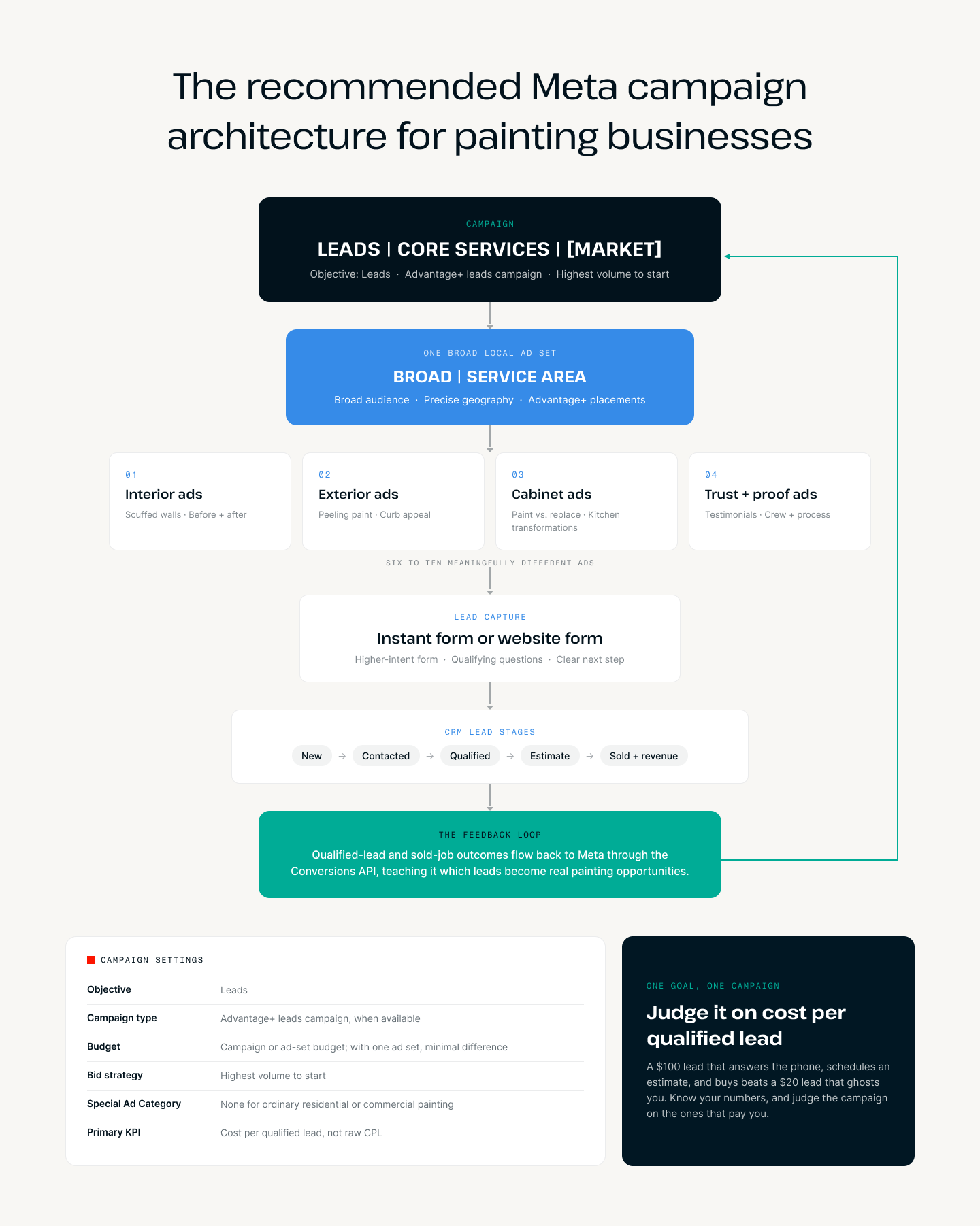
Here's the whole system on one napkin:
- Leads campaign
- One broad local ad set
- Interior, exterior, cabinet, and trust-focused ads
- Instant or website form
- CRM lead stages
- Qualified-lead and sold-job feedback sent back to Meta
In other words: consolidate the campaign, diversify the message, and close the loop.
Campaign level: One primary leads campaign
Start with one evergreen acquisition campaign for your core painting services.
Example campaign name: LEADS | CORE SERVICES | [MARKET]
- Objective: Leads
- Campaign type: Advantage+ leads campaign, when available
- Budget: Campaign or ad-set budget; with one ad set, the difference is minimal
- Bid strategy: Highest volume to start
- Special Ad Category: None for ordinary residential or commercial painting
- Primary KPI: Cost per qualified lead, not raw CPL
Don't create separate campaigns for every service, neighborhood, creative type, or audience interest. One goal, one campaign.
And notice the KPI: cost per qualified lead.
Do not judge this campaign purely on cost per form submission.
A campaign producing $35 leads can be more profitable than one producing $20 leads if those $35 leads answer the phone, schedule estimates, and buy more often.
Raw cost per lead is a platform metric. Cost per qualified lead, cost per estimate, customer acquisition cost, and return on ad spend are business metrics, and those rely on you knowing your numbers inside and out.
Ad-set level: Keep the audience broad, but the geography precise
Use one primary ad set.
Example ad-set name: BROAD | SERVICE AREA | 18+
Recommended audience settings:
- Geographic targeting limited to your actual service area
- A broad age range, usually 18+ unless your data supports something more specific (again, Meta will fine-tune this via their data)
- All genders
- Advantage+ Audience
- No required manual interest stack
- Appropriate customer and employee exclusions if you have them
- Advantage+ placements
Meta can use interest suggestions, customer lists, and website visitors as signals, but I wouldn't restrict delivery exclusively to those groups. Basically, you want to give it hints, not handcuffs.
Geography deserves special attention
Painting businesses cannot afford to generate leads outside their service area. There is no faster way to burn budget than paying for a lead you'd never drive to.
Your geographic controls should reflect where you'll realistically send an estimator—not every location you'd theoretically consider.
That could mean:
- Cities and ZIP codes you consistently serve
- A sensible radius around your operating area
- Separate territories only when they have meaningfully different economics or operations
Please resist the urge to create dozens of tiny ZIP-code ad sets. Pleaseeeee.
That fragments an already limited local audience, splits your budget, and makes it harder for each ad set to collect enough conversion data to stabilize. Meta itself recommends consolidating similar ad sets so its delivery system has more opportunities to learn.
Conversion location: Choose one of two structures
You have two primary lead-capture options.
Option A: Meta instant forms
Instant forms are often the better starting point if you have:
- A simple or underperforming website
- Low website conversion volume
- Limited tracking sophistication
- A strong speed-to-lead system
- CRM integration with Meta
Use a higher-intent form, not the easiest possible version. Frictionless forms produce frictionless leads—and frictionless leads have a funny way of not answering the phone.
Option B: Website forms
Website forms are often a better fit if you have:
- A fast, credible landing page
- Meta Pixel and Conversions API installed
- Reliable attribution
- A strong project gallery and reviews
- A form that converts well on mobile
Don't switch to a website form merely because the leads "feel better." Feelings are not a KPI. Compare qualified-lead rate and cost per qualified lead between the two, then let your numbers make the call.
Form setup
The form has one job: give Meta enough conversion volume while filtering out the obvious non-opportunities.
Recommended fields:
- Name
- Phone
- Project ZIP code
- Service requested
- Project timeline
- Homeowner or property decision-maker status
- Approximate project scope
An example service question:
What would you like painted?
- Interior
- Exterior
- Cabinets
- Commercial property
- Other
An example timing question:
When are you hoping to begin?
- As soon as possible
- Within 30 days
- Within one to three months
- Just researching
Now, a warning: don't swing to the other extreme and ask 12–15 questions.
Excessive qualification can crush your conversion volume so dramatically that Meta receives too little data to learn anything. A few good filters beat an interrogation.
The completion screen should also set clear expectations:
Thanks! A member of our team will call shortly to learn more about your project and schedule an estimate if it's a fit.
No surprises and no ghosting on either side.
Include a click-to-call or estimate-scheduling option when your team can actually respond immediately. If you can't, don't dangle it. Your follow-up and sales process means just as much as the leads themselves.
Ad architecture: Build six to ten meaningfully different ads
I'd launch with approximately six to ten materially different ads inside the same ad set. Creative diversity does not mean duplicating the same ad and swapping the headline, background color, or opening sentence. That's one ad wearing ten different outfits.
Test legitimately different customer needs and motivations.
And remember why this matters: Meta doesn't just evaluate who clicks your ad. Its systems analyze what the ad is about.
Vague copy gives Meta almost nothing to work with.
Ready to transform your space? Get your free quote today!
That could be selling candles, closet organizers, or a yoga studio. Meta has to do more guessing, and you're paying for the results of those guesses.
Every ad should communicate something specific:
- The location
- The customer
- The service
- The problem
- The solution
Creative group 1: Interior painting
Potential angles:
- Scuffed or dated walls
- Making a newly purchased home feel personal
- Full-room transformation
- Prep, protection, and cleanup
Example:
Overland Park homeowners: If your walls are scuffed, dated, or simply don't feel like you anymore, our team can give your home a clean, professional refresh.
Creative group 2: Exterior painting
Potential angles:
- Peeling or fading paint
- Curb-appeal transformation
- Protecting the exterior
- Seasonal availability
Example:
Fading, peeling paint isn't just a curb-appeal problem. It can leave your home exposed to moisture and weather damage.
Creative group 3: Cabinet painting
Potential angles:
- Painting versus replacement
- Kitchen before and after
- Professional finish
- Cost and disruption concerns
Example:
You may not need a new kitchen. Professionally painted cabinets can completely change the room without the cost of a full renovation.
Creative group 4: Trust and proof
Potential angles:
- Customer testimonial
- Local project case study
- Crew or process video
- Reviews, warranty, and professionalism
Example:
Here's what this Kansas City kitchen looked like before—and what we completed five days later.
Use a mix of formats
A strong starting mix might be:
- Two before-and-after videos
- Two customer- or problem-focused videos
- Two static transformation ads
- One testimonial ad
- One crew or process ad
This is one ad set with multiple meanings—not multiple ad sets for every creative category.
Meta's system can interpret each ad and match it with homeowners whose behavior suggests that message or service may be relevant.
Real project content is your best asset here.
A clear kitchen transformation or exterior before-and-after helps Meta understand the service while showing a homeowner a result they can immediately picture in their own house.
Generic stock photography does neither job well, and using AI-generated content can hurt you just as much (if not more) than it helps.
Should services have separate ad sets?
Usually, no. Not initially.
Keep interior, exterior, and cabinet ads together when:
- They serve the same territory
- They use the same lead destination
- You're willing to accept all those project types
- Lead volume is modest
- The services have reasonably similar economics
Separate a service only when there's a real operational reason:
- Exterior painting has a defined seasonal budget
- Cabinet projects go to a different sales team
- Commercial and residential leads require different forms
- One service has a substantially different service area
- You need to guarantee budget for a priority service
- Lead values and close rates differ dramatically
Even then, I'd normally use one ad set per service campaign—not several competing interest ad sets.
The rule I give members is simple:
Complexity should follow a real business requirement, not an old habit of segmenting everything.
Do you need a retargeting campaign?
Most smaller local painting companies don't need a large standalone retargeting structure.
I know that's not the answer the gurus give you. Honestly, it's probably not the answer I would have given you 3 months ago.
If you build a retargeting campaign around an audience that's too small, you'll get high frequency, limited delivery, and budget that probably should have gone toward reaching new homeowners.
You end up haunting the same 400 people.
Add a separate retargeting campaign only if you have:
- Meaningful website traffic
- Consistent video engagement
- A sufficiently large local audience
- Enough budget to avoid starving acquisition
- A long enough consideration period to justify it
Example campaign name: RETARGETING | PROOF + URGENCY | [MARKET]
Potential audiences:
- Website visitors
- Facebook and Instagram engagers
- Video viewers
- People who opened but didn't submit an instant form
- Exclude submitted leads and current customers where appropriate
Retargeting creative should focus on:
- Testimonials
- Local case studies
- Your project process
- Warranty or guarantee
- Scheduling availability
- "Still considering your project?" messaging
As a starting rule of thumb, I would keep retargeting around 10–15% of spend and only if you feel as though you're pretty damn comfortable working within Meta's ecosystem. I'd eliminate it entirely if frequency becomes excessive or you can't demonstrate that it's adding results you wouldn't have gotten anyway.
What should the campaign optimize for?
That depends on how much reliable signal your business produces. There are two stages you fall into:
Stage 1: You don't have enough qualified-lead data
Optimize for:
Maximum number of leads
This is where most painting companies should start. You want Meta optimizing toward your best leads—but only when you're generating enough of them for the system to learn from.
If you only send Meta a few qualified leads each week, it doesn't have enough information to identify a reliable pattern. Optimizing for all leads gives it more data to work with and helps keep delivery stable.
The tradeoff is that Meta will find people likely to submit a form—not necessarily people likely to answer the phone, schedule an estimate, or buy.
That's why your priority during this stage is building a better feedback loop:
- Connect your CRM to Meta
- Define what counts as a qualified lead
- Track estimates, sold jobs, and revenue
- Send those outcomes back consistently
You're not staying here forever. You're giving Meta enough data to perform now while building toward qualified-lead optimization later.
Optimize for the deepest event you can produce consistently—not simply the deepest event available in Ads Manager.
Stage 2: You do have enough (and reliable) qualified-lead data
Optimize for:
Maximum number of qualified leads
To get here, you need:
- A CRM connected through Conversions API
- A consistent definition of "qualified"
- Timely CRM status updates
- Enough recurring events for Meta to learn
Beginning in April 2026, Meta requires a Conversions API integration for newly created campaigns using the qualified-leads performance goal. Its qualified-lead setup guidance explains the CRM requirement.
Meta is telling you, clearly, that it wants downstream sales information—not just the initial lead.
What should count as a qualified lead?
You get to define this for your business—but create one consistent definition. One (!!!).
For a painting company, I would define a qualified lead as someone who:
- Is inside your service area
- Owns or makes decisions for the property
- Requested a service you offer
- Meets your minimum project size or value
- Has a reasonable timeline
- Has been contacted or is ready to schedule an estimate
Don't mark someone qualified simply because they submitted a form.
How do you tell Meta who is qualified?
Your CRM and Meta need to be connected through the Conversions API. Depending on your CRM, this can be done through a native integration or an automation tool.
Once connected, the process is pretty simple:
- A new lead enters your CRM.
- Your team contacts and qualifies the lead.
- Someone changes the lead's status to Qualified in the CRM.
- The integration sends that update back to Meta.
- Meta matches it to the person who originally submitted the lead and uses that information to improve future delivery.
Your team isn't manually reporting every lead inside Ads Manager. They just need to keep the CRM updated. The integration handles the communication in the background.
And here's the part people miss: if you or your office team applies the definition inconsistently, the data you send Meta is inconsistent. The algorithm learns from whatever you give it—even when what you give it is wrong.
Garbage in, garbage out.
What if you don't generate enough qualified leads?
Meta's general guidance says an ad set needs around 50 optimized events within seven days to exit the learning phase. That's exactly why consolidation matters.
A local painter may not generate 50 qualified leads every week, and that's fine.
It doesn't make qualified-lead data useless. It means the optimization event has to be chosen pragmatically:
- Optimize for all leads, not just qualified, while tracking which ones become qualified opportunities and sold jobs
- Keep the campaign consolidated
- Send every qualified and sold outcome back
- Test qualified-lead optimization once volume is reasonably consistent
- Compare cost per qualified lead and cost per sale—not Ads Manager's raw CPL
Your CRM is part of your ad system
If you only take one section from this post, make it this one. You absolutely have to have a CRM and you absolutely have to connect it to Meta Ads.
If Meta only knows who submitted a form, it will optimize toward people who are likely to submit forms. That's it.
That's how you end up with cheap leads who never answer, live outside your service area, rent the property, want a $200 touch-up, or have zero intention of hiring anyone soon.
Meta needs deeper feedback—and you're the only one who can give it.
Your tracking system should look something like this:
- New lead (send to Meta): records the initial conversion
- Contacted (send when useful and supported): measures follow-up progress
- Disqualified (retain internally): identifies lead-quality problems
- Qualified lead (send to Meta): provides an optimization signal
- Estimate scheduled (send when supported): indicates stronger intent
- Estimate completed (send when supported): measures sales-process progress
- Job sold (send to Meta): records the true business outcome
- Job revenue (send when supported): communicates customer value
Meta's Conversions API creates a direct connection between your marketing data and Meta's optimization systems.
That's what teaches the platform the difference between "person who filled out a form" and "person who became a paying customer."
Your CRM should capture and preserve:
- Meta lead ID for instant forms
- UTMs
- Campaign, ad-set, and ad IDs
- Click identifiers when applicable
- Lead source
- Qualification or disqualification reason
- Estimate status
- Sold revenue
Send updates promptly and consistently.
A CRM full of permanently untouched "new leads" gives Meta no meaningful downstream feedback. It's the data equivalent of leaving voicemails for yourself.
Recommended campaign structures by budget
Under $100 per day
- One leads campaign
- One broad geographic ad set
- Six to eight ads
- No dedicated retargeting campaign
- Optimize for leads until qualified-lead feedback is reliable
This is the right architecture for many Painting Business Pro members, and there is zero shame in it.
Simple structures with strong creative beat complicated structures with weak creative at every budget level.
$100–$300 per day
- One primary acquisition campaign
- One broad ad set
- Eight to twelve active creative concepts
- Optional small retargeting campaign
- CRM and Conversions API qualified-lead feedback
- A separate priority-service campaign only when operationally necessary
Above $300 per day
At this level, you may have enough budget and conversion volume to support:
- Core residential acquisition
- A separate seasonal or strategic service campaign
- A separate commercial campaign
- Retargeting
- Structured creative testing
- Qualified-lead or deeper-funnel optimization
The structure should expand because the business has distinct objectives—not merely because more budget is available.
Complexity is earned, not assumed.
The default build I'd teach members
Here's the whole thing, top to bottom:
- CAMPAIGN: LEADS | CORE SERVICES | KANSAS CITY
- AD SET: BROAD | SERVICE AREA | 18+ (Advantage+ Audience, Advantage+ placements, highest-volume bidding, optimize for leads or qualified leads, exclude current customers where appropriate)
- 01 | Interior | Before/After
- 02 | Interior | Scuffed Walls
- 03 | Exterior | Peeling Paint
- 04 | Exterior | Curb Appeal
- 05 | Cabinets | Paint vs. Replace
- 06 | Testimonial | Local Homeowner
- 07 | Process | Prep and Cleanup
- 08 | Trust | Crew + Reviews
- AD SET: BROAD | SERVICE AREA | 18+ (Advantage+ Audience, Advantage+ placements, highest-volume bidding, optimize for leads or qualified leads, exclude current customers where appropriate)
This gives Meta one concentrated pool of data and eight distinct ways to understand your company, your services, and the homeowners most likely to need them.
How do you know when you need new creative?
Don't replace ads just because they've been running for a certain number of days. And don't panic over one bad afternoon.
Look for a pattern across several metrics:
- Frequency is rising while click-through rate is falling: the same people have seen the ad too many times
- Cost per lead is rising while results decline: the creative may be losing its ability to convert
- Link CTR is falling and cost per click is rising: the ad is no longer getting—or holding—attention
- Raw CPL is stable, but qualified-lead rate is falling: the creative may be attracting the wrong people
- One ad is receiving most of the budget and its performance is declining: you need new concepts before the winning ad burns out
- Meta labels the ad "Creative fatigue": Meta is directly telling you the audience may be tired of it
The combination matters. Frequency alone isn't a reason to turn off an ad. If frequency is rising but the ad is still producing qualified leads at a profitable cost, leave it alone.
Likewise, a higher CPM doesn't automatically mean you need new creative. CPM can change because of seasonality, competition, audience size, or the auction itself. Meta specifically warns against diagnosing campaign performance from CPM alone.
A stronger sign is when frequency rises, CTR falls, and cost per qualified lead increases together. That's when the audience is likely tired of the ad.
Also pay attention to lead quality. If an ad is still producing cheap leads but fewer of them are qualified, the creative may be making the wrong promise or speaking too broadly. In that case, you don't just need a new image. You need a clearer message.
And "new creative" does not mean putting the same headline over a different stock photo. Test a new:
- Customer problem
- Service
- Offer
- Hook
- Before-and-after project
- Testimonial
- Format or opening shot
Don't wait until every ad is exhausted. Meta recommends creative diversification because different messages give its system more opportunities to connect the right ad with the right person. Keep a few new concepts ready so you can introduce them before performance completely falls apart.
The bottom line
The old approach to Meta advertising was to build a narrowly defined audience, then show that audience an ad.
The emerging approach is to give Meta:
- A clearly expressed service and offer
- Multiple, meaningfully different creative concepts
- Enough freedom to find prospects within your service area
- Accurate information about which leads became qualified estimates and sold jobs
The campaign shouldn't tell Meta which tiny interest audience gets each message.
The ads should clearly express several different homeowner needs. Then your CRM should teach Meta which matches produced qualified estimates and sold painting jobs.
The winning strategy for painting contractors isn't a maze of campaigns and interest audiences.
It's a consolidated campaign, specific creative, real project content, fast follow-up, disciplined CRM management, and a closed feedback loop between marketing and sales.
Consolidate the delivery. Diversify the creative. Deepen the feedback signal.
And if your account currently looks like the "before" picture in this post? No shame.
Now you know—and cleaning it up is a lot easier than continuing to pay for a structure that no longer makes sense.
Sources
- Meta Engineering: Exploring Hierarchical Interest Representation for Meta Ads Deep Funnel Optimization
- Meta Business Help Center: About the Learning Phase
- Meta Business Help Center: Best Practices for Meta Ads Delivery
- Meta Business Help Center: Set Up Your CRM for Qualified Leads
- Meta Business Help Center: About Conversions API